EWM MES integration connects SAP Extended Warehouse Management with the manufacturing execution system, so that handling units produced on the shop floor can be received into the warehouse automatically. It defines who creates the HU and which document the receipt is booked against.
This article explains the two receiving scenarios SAP supports, the routes that connect the two systems, and the questions to answer before a project starts. The goal is to help you choose a setup that fits your production and warehouse processes.
Receiving from production means that goods produced on the shop floor arrive in the warehouse as handling units. Without an integration, staff enter these receipts by hand. This slows the process and can make the stock in EWM differ from what the shop floor reports.
With an EWM MES integration, the receipt data flows automatically. The warehouse can plan put-away earlier, and the production team can see the status of each HU without asking the warehouse for updates.
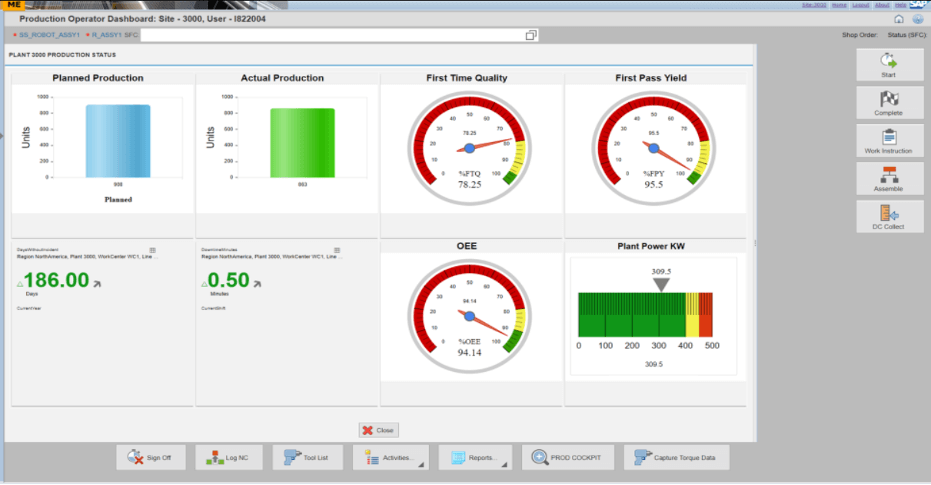
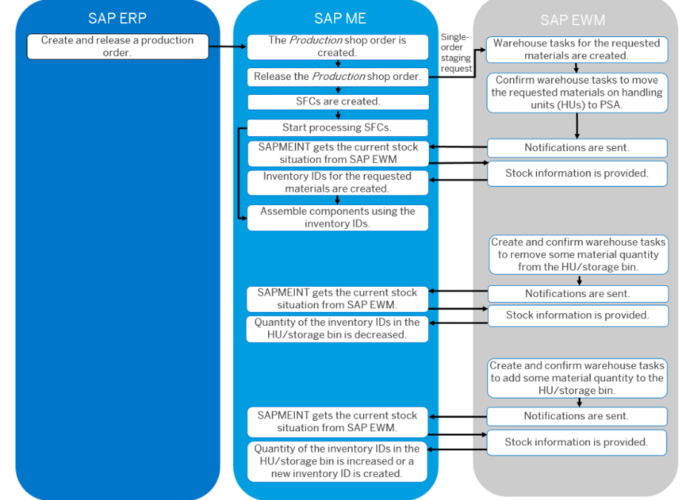
SAP describes two basic patterns for receiving from production:
Assigning each production line to one pattern keeps the document flow easy to trace. When two patterns run in the same plant, a receipt can be hard to follow if the team does not know which system started it.
SAP lists three routes for connecting EWM with the MES layer:
The route you choose also determines where the HU data is maintained. Settle it before you design the HU structure, because a later change of route usually means reworking the HU ID logic.
There are several ways to implement EWM – MES direct integration for receiving HUs in EWM. One common approach is to use an interface or middleware solution that connects the two systems and allows for data exchange. This can be done using APIs (Application Programming Interfaces) or other integration tools, such as an integration platform as a service (iPaaS).
SAP provides a range of APIs (Application Programming Interfaces) that can be used to integrate SAP MES with SAP EWM. Some of the important APIs provided by SAP for this purpose include:
However, EWM MES integration can also be done with non-SAP systems. Some APIs provided by SAP for this situation are as follows:
These are just a few examples of the APIs that can be used to integrate SAP MES and SAP EWM. The specific APIs that are used depend on the integration requirements and the capabilities of the systems involved.
Another option is to use a pre-built integration solution, such as a pre-configured interface or connector. This can be a faster and simpler option, as it requires less customization and setup. However, it may not offer as much flexibility as a custom interface or middleware solution.
Consider a bottling line that produces finished pallets across three shifts. The MES creates an HU for each pallet and sends the receipt to EWM.
EWM creates a receiving task, and the forklift driver scans the HU label at the storage location and places the pallet in a bin. The production team sees the pallet as received in the MES, and the warehouse sees the same HU in EWM. This is a simplified illustration, and the exact steps depend on your configuration.
Choose ERP-triggered receiving when production orders in SAP ERP already drive the shop floor and the MES mainly confirms progress.
Choose MES-based receiving when the shop floor creates the HUs and needs them in the warehouse right away. A third-party MES can connect through the EWM API. Check your current systems first, because the MES product often decides the route.
If you want to understand how HUs are managed in EWM before you design the receiving flow, read our guide to handling unit management in SAP EWM. For another integration of EWM with an external data source, see our article on RFID integration with SAP EWM, which explains how identification data reaches the warehouse.
No. SAP ME is one option. Third-party MES platforms can connect through the EWM API, and SAP MII is also listed as an MES option.
Yes. SAP lists the EWM API as the route for third-party MES systems to send receiving data to EWM.
Start with one production order type on one pilot line. Check that each HU appears once in EWM and once in the MES, with the same ID and the same quantity.
An EWM MES integration for receiving HUs removes manual entry and keeps the warehouse and the shop floor on the same HU data. Start by choosing between ERP-triggered and MES-based receiving, then design the HU structure and test with real labels. This order keeps the project focused and reduces surprises at go-live.

SAP TM – EWM Consultant
Serhan Kurt works on SAP TM and EWM projects covering transportation planning, freight management and warehouse processes. He is the author of “SAP TM: Senaryolar, Testler ve Uyarlamalar ile Birlikte”, the first book on SAP TM written in Turkish.
Your mail has been sent successfully. You will be contacted as soon as possible.
Your message could not be delivered! Please try again later.