SAP Extended Warehouse Management (EWM) plays a critical role in managing logistics operations and accurate inventory management is a basic requirement for businesses. In this context, SAP EWM Counting procedures ensure accurate tracking and management of inventory. However, errors are inevitable during operations and these errors must be resolved quickly and effectively. At this point, SAP EWM Difference Analyzer is a powerful tool that helps users identify and correct inventory differences.
In this article, we will explore the potential of optimizing inventory management processes by focusing on quantity correction processes in Difference Analyzer.
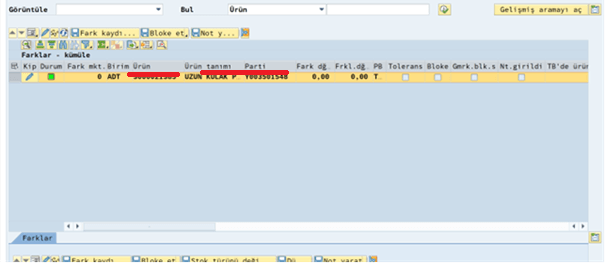
1. The relevant difference is selected in the Diff analyzer.
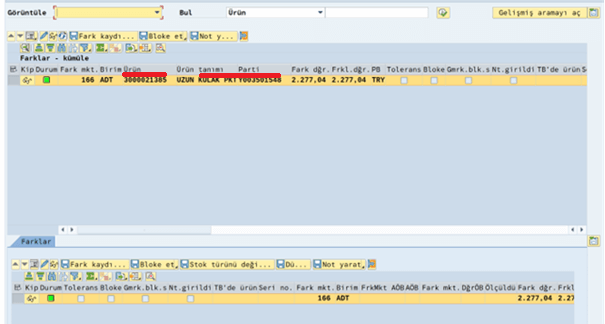
2. Select the difference from the differences tab on the bottom line and click on the 'Correct and Save' option.
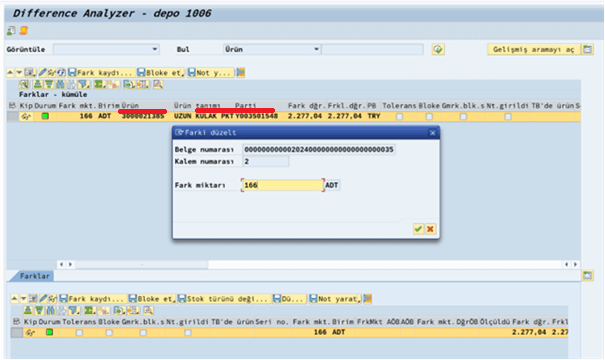
3. The difference amount is updated to '0'.
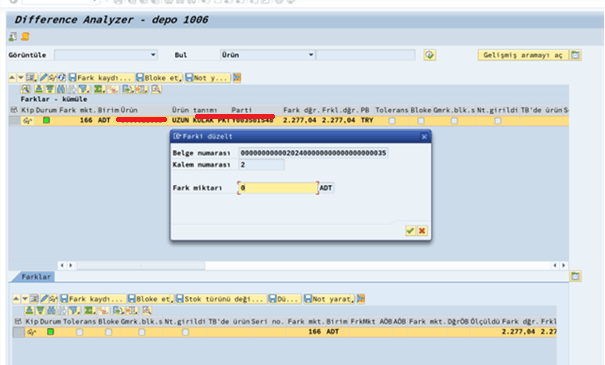
4. It is observed that the difference amount in the top line turns to 0. If the difference amount is '0', the difference record is saved by pressing the 'Save Difference Record' button. Since the difference is 0, the system will not send a record to ERP and the relevant line will be automatically deleted from the system.
Difference Analyzer's quantity correction steps provide its users with valuable guidance in quickly identifying inventory differences, analyzing their causes, and taking corrective action. Quantity correction steps ensure that inventory is kept accurate and up-to-date, increasing operational efficiency and providing cost savings to businesses. Therefore, SAP EWM users are expected to optimize their inventory management processes and improve business performance by using Difference Analyzer effectively.

SAP EWM Consultant
Your mail has been sent successfully. You will be contacted as soon as possible.
Your message could not be delivered! Please try again later.