SAP Fiori is a user experience (UX) technology designed to simplify and modernize the SAP user interface across various devices. It offers a personalized and responsive interface that enhances user productivity and satisfaction. However, implementing Fiori applications in a traditional manner can cause significant time and effort loss. It can be quite painful to activate apps and required services one by one. This is where Fiori Rapid Activation comes in as a life-saver, ensuring rapid time-to-value for businesses.
Fiori Rapid Activation is a methodology used to facilitate the deployment of Fiori apps by simplifying processes, automating repetitive tasks and reducing manual effort, thus increasing the business benefits.
Firstly, navigate through the SAP Fiori Apps Reference Library to identify the Business Roles required for activating the Fiori apps you intend to use. Then, go to transaction code STC01 in your SAP system to execute the task list SAP_FIORI_CONTENT_ACTIVATION, which handles content activation and configuration for one or more SAP Business Roles.
In STC01, users can choose between foreground and background jobs depending on the complexity of the task and system performance. Background jobs are preferred for extensive data processing or system maintenance to avoid disrupting user productivity, while foreground jobs are suitable for small tasks that require user interaction.
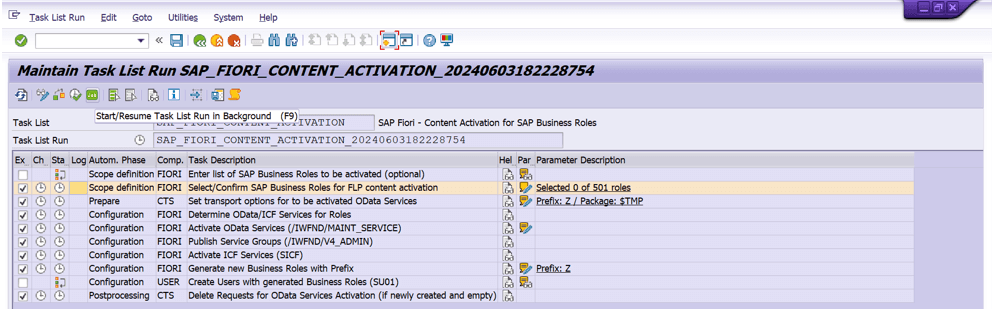
Within the task list SAP_FIORI_CONTENT_ACTIVATION, you can configure both preset and optional tasks. Once you have selected the required Business Roles and made the necessary adjustments, execute all the tasks.
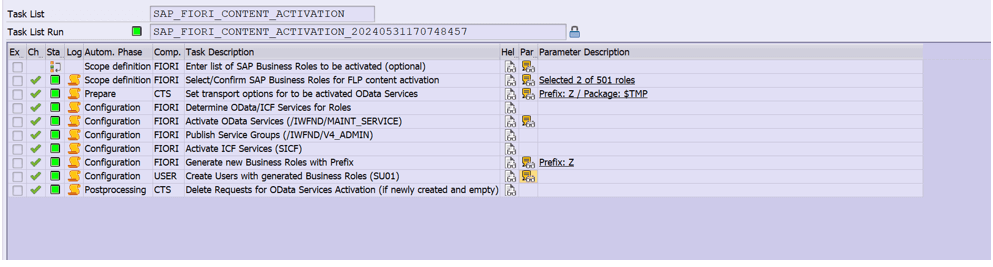
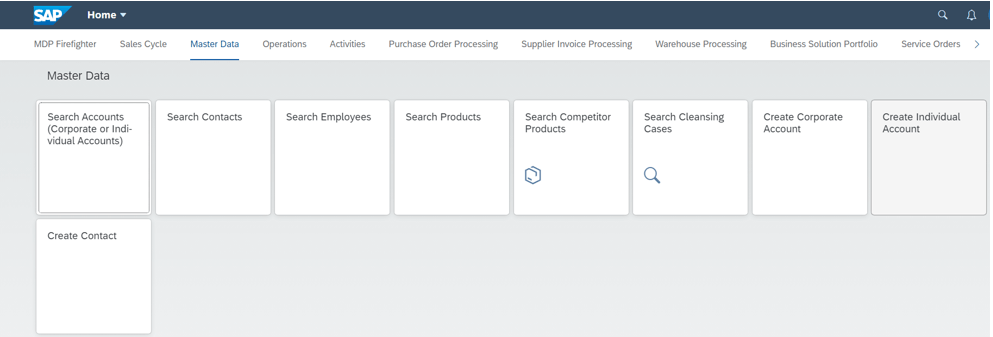
Finally, verify the activation by navigating to the Fiori Launchpad with a user assigned to the associated business role. This will allow you to access the Fiori apps associated with the relevant business roles in the Fiori Launchpad.
Fiori Rapid Activation is a game-changer for businesses seeking to leverage SAP Fiori efficiently. By simplifying processes, automating tasks, and reducing manual effort, it allows enterprises to achieve quick and substantial business benefits, keeping them ahead in a competitive market.

SAP Fiori Consultant
Selin Köleş is an SAP consultant specialized in SAP Fiori and ABAP development. At MDP Group, she focuses on SAPUI5, ABAP Cloud, RAP, Fiori Elements, SAP BTP, the SAP Clean Core strategy, and SAP AI Core. She actively participates in Fiori application development projects within the SD, MM, FI, and EWM modules.
Your mail has been sent successfully. You will be contacted as soon as possible.
Your message could not be delivered! Please try again later.