SAP offers various tools to help businesses with digital transformation and operational efficiency. In this article, we will explore two important SAP tools: EWM Mobgui and Screen Personas. Both of these tools enhance user experience and enable processes to be managed faster and more effectively.
EWM (Extended Warehouse Management) Mobgui is a mobile application interface developed by SAP for warehouse management. Designed to optimize warehouse processes, EWM Mobgui allows field workers to manage warehouse operations more quickly and accurately. This application enables warehouse staff to perform real-time data entry and track warehouse activities using mobile devices or handheld terminals. As a result, speed and accuracy increase in warehouse operations, while errors in processes are reduced.
EWM Mobgui has a simplified and intuitive user interface, which allows warehouse employees to quickly adapt to the system. Easy navigation and understandable menus help users complete tasks more efficiently. Additionally, the application's mobile compatibility allows employees to track tasks from anywhere.
EWM Mobgui processes warehouse movements in real time within the ERP system. This ensures that data such as stock levels, goods receipt, and shipping activities are continuously updated, and each transaction is recorded immediately in the system. Real-time data allows warehouse managers and staff to monitor all processes live and intervene quickly if necessary.
EWM Mobgui works on mobile devices and handheld terminals, offering flexible usage. Handheld terminals make barcode scanning and other data entry tasks faster and easier. This flexibility allows warehouse staff to work not only at their desks but also at any point in the warehouse.
EWM Mobgui features barcode scanning and automatic data validation. This significantly reduces the error rates caused by manual data entry. For example, barcode scanners can be used during stock counting to prevent incorrect product entries, enhancing the accuracy and efficiency of warehouse processes.
Screen Personas is a tool that allows users to customize and simplify SAP GUI screens. It aims to improve user experience and increase productivity. Using Screen Personas, SAP users can personalize system screens according to their needs, enabling them to work faster and more efficiently. In particular, user-friendly interfaces and simplified processes are key elements that enhance operational efficiency.
Screen Personas allows users to fully personalize their screens. Users can keep only the necessary fields on their screens to access relevant information more quickly. This customization creates a more efficient work environment for each user.
SAP systems can sometimes present complex and dense information. Screen Personas eliminates unnecessary fields and processes, enabling users to focus on the information they need. This allows users to complete tasks with fewer steps and accelerates processes.
Screen Personas enables screen customizations without the need for technical knowledge. Changes to screen designs can be made using a drag-and-drop method. This means that SAP users can easily customize user interfaces even without technical expertise.
Fewer steps in completing tasks allows users to finish their work faster. Removing unnecessary steps and simplifying screens increases workforce efficiency, enabling faster decision-making.
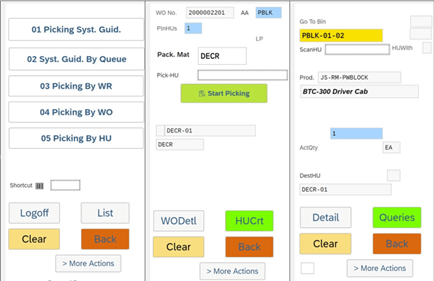
When used together, EWM Mobgui and Screen Personas can make warehouse management processes more efficient and user-friendly. EWM Mobgui interfaces can be customized with Screen Personas to create simpler and more functional screens for users. This allows for solutions that require less training and can be quickly adapted. Additionally, data collected from mobile applications can be processed on personalized screens, providing managers with tailored reports, enabling real-time and customized operations.
The differences between EWM Mobgui and old RFUI technology are especially noticeable in user experience, processing speeds, and technological advancements. The old RFUI technology relied on creating HTML templates for each screen. This meant custom screen designs had to be created for each user and were often limited to classic views. EWM Mobgui, on the other hand, offers a modern mobile interface that provides a flexible, dynamic, and user-friendly experience. Mobgui is compatible with mobile devices, allowing field workers to track processes like inventory, goods receipt, and shipping in real time. Additionally, it offers advantages like screen customization and real-time data processing, increasing both efficiency and user satisfaction.
Feature | Old RFUI Technology | EWM Mobgui |
User Interface | Classic, static, and fixed screens | Modern, dynamic, and user-friendly interfaces |
Screen Templates | HTML templates needed for each screen | Automatic screen generation and customization |
Mobile Compatibility | Desktop-focused, not compatible with mobile devices | Compatible with mobile devices and handheld terminals |
Flexibility | Limited flexibility, fixed screen layout | High flexibility, screens can be customized |
Real-Time Data | Data usually processed in batch jobs | Real-time data entry and processing |
User Experience | Complex and instructional processes required | Simple and fast processes with a user-friendly experience |
Technology Infrastructure | Uses older SAP GUI technology | Compatible with modern web-based mobile platforms |
Conclusion
EWM Mobgui and Screen Personas are powerful tools for SAP users that streamline and accelerate operational processes. Managing warehouse processes via mobile devices and customizing screens to meet user needs provide a significant advantage, improving business efficiency and supporting digital transformation efforts.
Contact our expert SAP consultants and discover the most effective ways to optimize your business processes with EWM Mobgui and Screen Personas solutions.

SAP Fiori Consultant
Hakan Balcı leads digital transformation initiatives focused on SAP Clean Core and ABAP Cloud. He develops cloud solutions using RAP and SAP BTP and digitalizes processes with expertise in Flexible Workflow, BRF+, and Adobe Forms. He serves as a solution architect in international projects.
Your mail has been sent successfully. You will be contacted as soon as possible.
Your message could not be delivered! Please try again later.