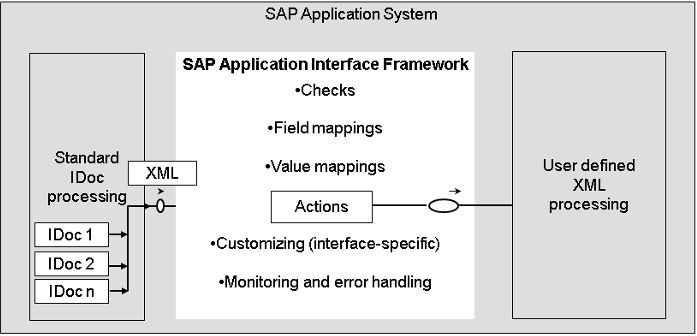
In SAP, it is necessary to transfer master data such as supplier, material, customer or invoice information between decentral systems. For example, if you are using an EWM module and a TM module has been added to the company recently, this type of master data information is required for the system to work. To give an example of the opposite situation, when you create an inbound delivery based on the purchase order on the ERP side, the ERP delivery is not transferred to the EWM side or TM side, since the material master data is not defined on the EWM/TM side. Therefore, you can not take any action on the EWM/TM side. In order to avoid such problems, we will examine the subject of IDoc in this article, which is one of the master data transport methods.
Reference : https://help.sap.com/docs/SAP_APPLICATION_INTERFACE_FRAMEWORK/1cefaed5b7a3471cb08564e54d5ba866/12e78755a3b17d43e10000000a4450e5.html?locale=en-US&version=3.0
Table of Contents
This must be done on both the target and source systems. Activating the message types allows data that can and cannot be moved. For example; The MATMAS controls material master data, the CREMAS controls vendor master data. This customizing can be done with the transaction code BD50.
Message type customising should be made to the Logical System (LS) partner profile with the WE20 transaction code. In the Inbound Section customisings should be completed in target system and in the Outboun Section customisings should be completed in source system. They should be selected on the left side of the screen. And also it is important that target or source system needs to be log in while transfering decentral system transfer.
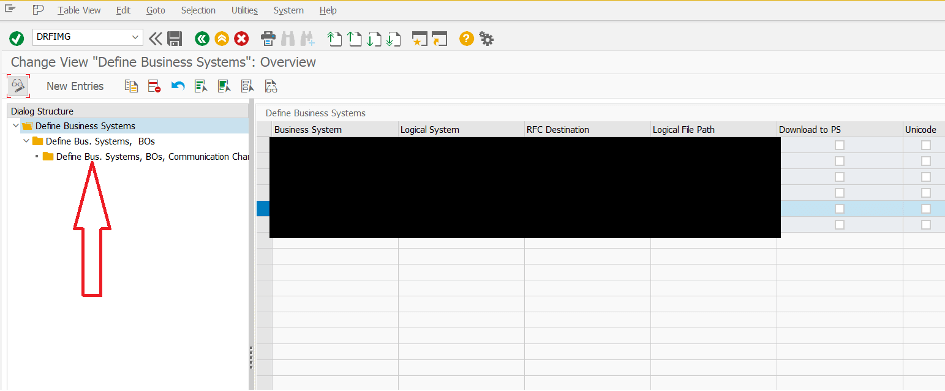
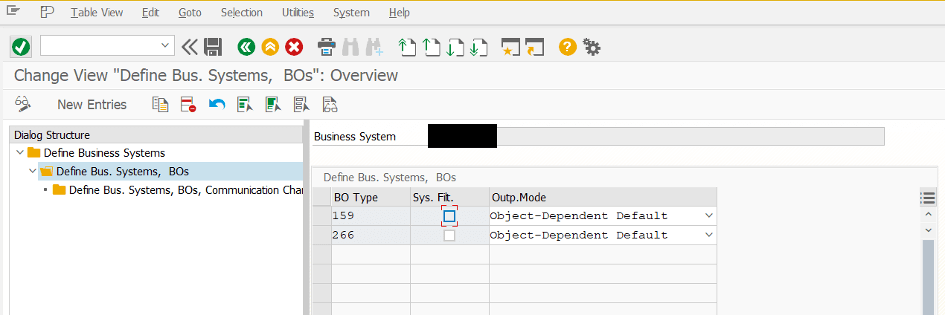
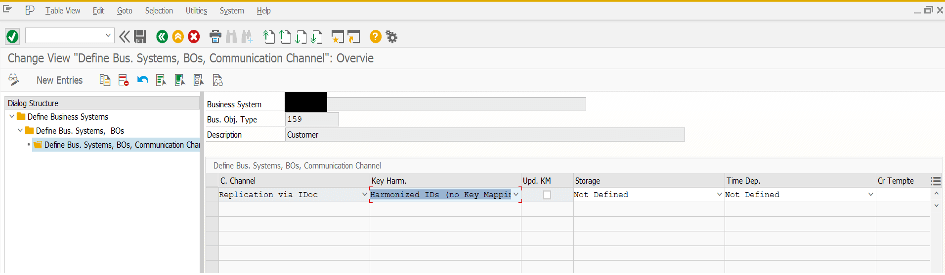
In the DRF customizing, Logical Systems and their RFC destinations have to be defined with the transaction code DRFIMG. Otherwise, systems can not send and receive Idoc messages and get dump error. Both od target and source systems must exist in in the target and source system section. After that Define Bus. Systems, Bos needs to be customized according to the message type. For example for the customer and vendor master data 159-Customer and 266-Supplier have to be defined. Also Define Bus. Systems, BOs, Communication channels have to contain an entry. The entry should be ‘Replication via Idoc ‘, ‘Harmonized IDs (No Key Mapping)’ and other sections ‘Not Defined’. (SAP Note: 2363365)
In this section, we will examine the vendor master data transfer with IDoc step by step. There is a different transaction code for each master data class. In addition, the transaction codes are different for the IDoc transfers that are sent and the IDoc transfers received. For Vendor Master data, the t-code for sending from the source system is BD14, and the t-code for accepting IDoc in the target system is BD15.
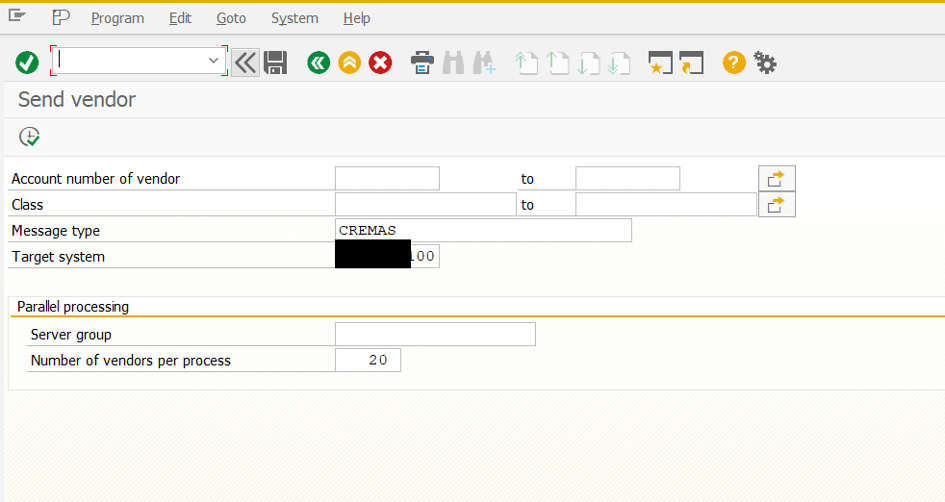
Vendor master data is sended with BD14 t-code in the Source system. If account number is not specified, system will send all of vendor to the target system.
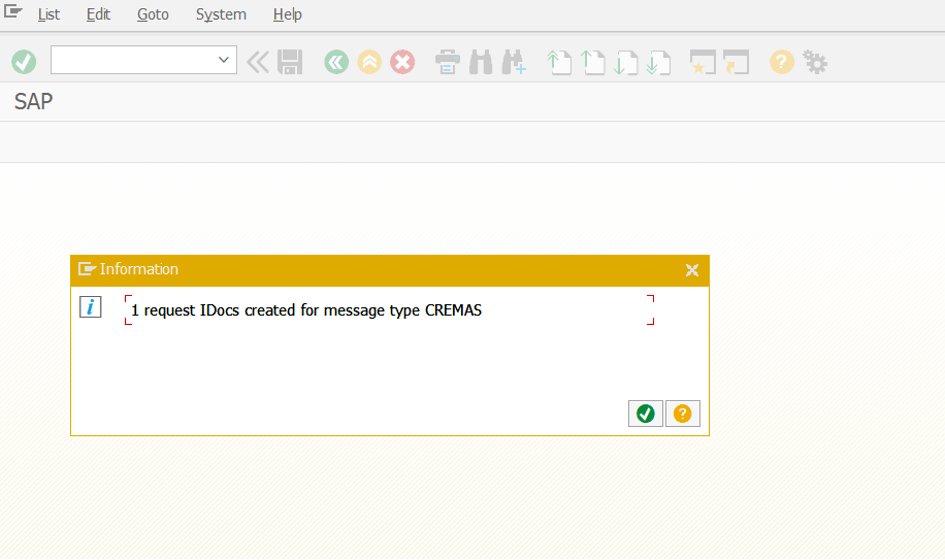
After sending, a success message should be displayed by the system.
It is necessary to check the IDoc situation with the BD87 t-code. We can see completed IDocs with green and faulty IDocs with red status on the left side of the three. We can also see the problem which caused the incorrect. It can be fixed with necessary customisings in other SAP screens and after that processing Idoc again is possible in this screen.
We can also see the successful IDoc list with double clicking the EA line.
Vendor master data is received with BD15 t-code in the Target system. Message type has to be specified as CREMAS for vendor master data.
A success message should be displayed after execution. If it is not possible there would be problems with Logical System and RFC customisings.
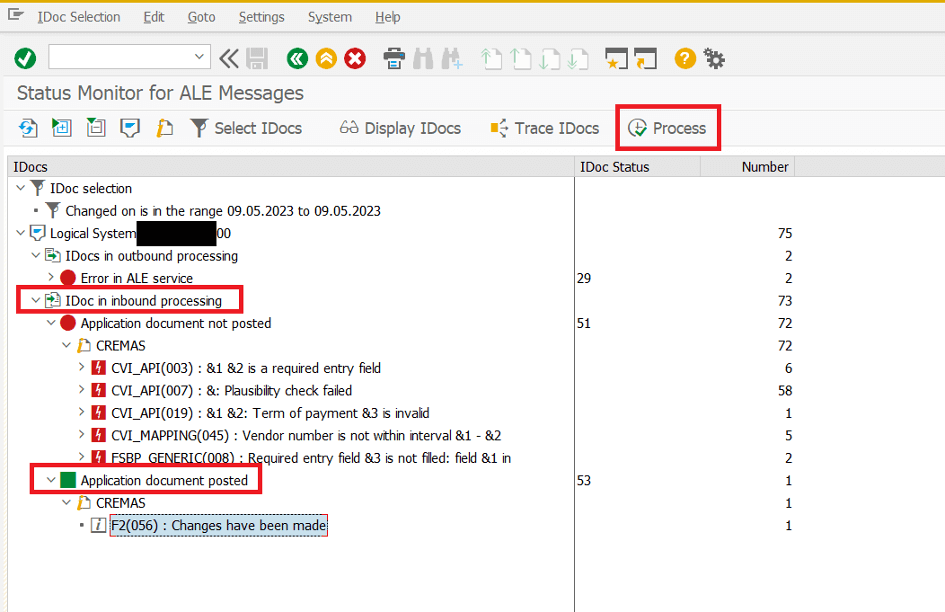
It is important to check the IDoc situation with the BD87 t-code again. We can see completed IDocs with green and faulty IDocs with red status on the left side of the three. We should be careful about analyzing the inbound section on the left side. We can also see the problem which caused the faulty. It can be fixed with necessary customisings in other SAP screens and after that processing IDoc again is possible in this screen, too.
Transferred vendors can be checked in Table LFA1. The vendors which can not be transferred completely can be processed in BD87 after necessary customizing are completed. There is no need to create a new IDoc.
SAP TM – EWM Consultant
What is SAP Signavio Process Intelligence?
What is SAP Signavio Process Intelligence?SAP Signavio Process Intelligence focuses on data-driven change. That's why companies use the solution to...
Creating Tables in SAP: Transactional, Customizing and Master Data
Creating tables in SAP is a fundamental step for businesses to store and manage their data in an organized way. In this process, data is usually...
What is SAP Cloud Integration?
Today, technological developments enable cloud computing to become widespread. The use of cloud-based services is used quite naturally in parallel...
What is IT Asset Management Software?
The ITAM - Quick GuideBusinesses today have more assets to manage than ever before, with the rise of IT assets used in the workplace. As employee...
What is an Integration Platform?
In this article, we will discuss the definition, importance and components of the integration platform.Definition of Integration PlatformThere are...
Chatbot Memory and Management
Introduction Chatbots are becoming an increasingly common part of daily life, assisting users across a variety of tasks. As interactions with these...
Continual Learning in Large Language Models
Introduction Large Language Models (LLMs) have reached impressive levels of reasoning, generation, and generalization. Yet they share a structural...
What is SAP Flexible Workflow?
Flexible Workflow is a new workflow model designed to facilitate workflow configurations. The workflow model has features that can send instant...
Everything You Need To Know About XRechnung
We have put together frequently asked questions (FAQ) about XRechnung for you. With the help of the following answers, you can find out more about...
Your mail has been sent successfully. You will be contacted as soon as possible.
Your message could not be delivered! Please try again later.