
Cloud Connector is an application that creates a secure connection with SAP ‘cloud’ in order to ensure that systems in customers' on-premises or private cloud environments communicate securely with SAP Cloud products. It can be installed on Windows, Linux and Mac OS operating systems.
On-premise systems and resources that can be accessed by cloud applications.
Compared to the approach of opening ports on the firewall and providing access to internal systems using reverse proxies in the DMZ, Cloud Connector offers the following advantages:
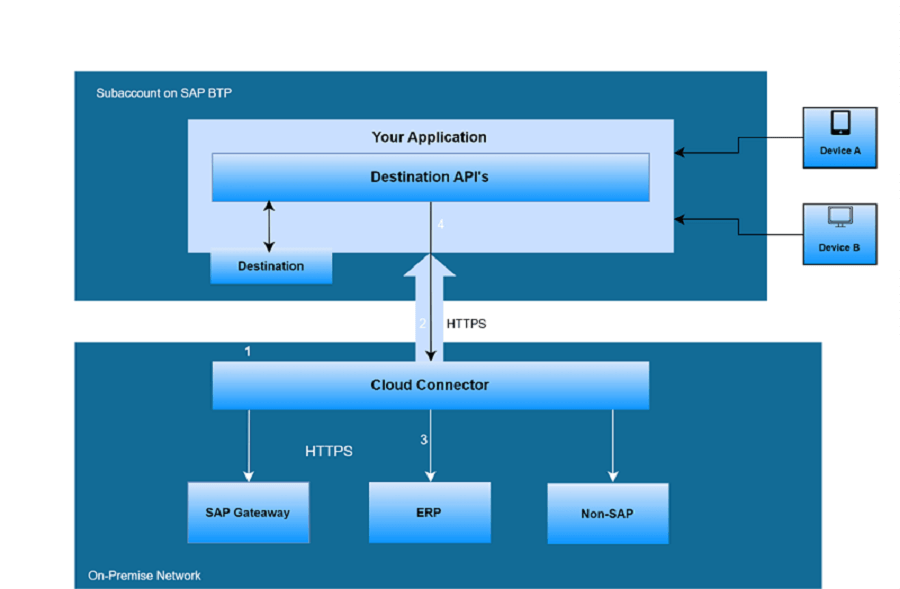
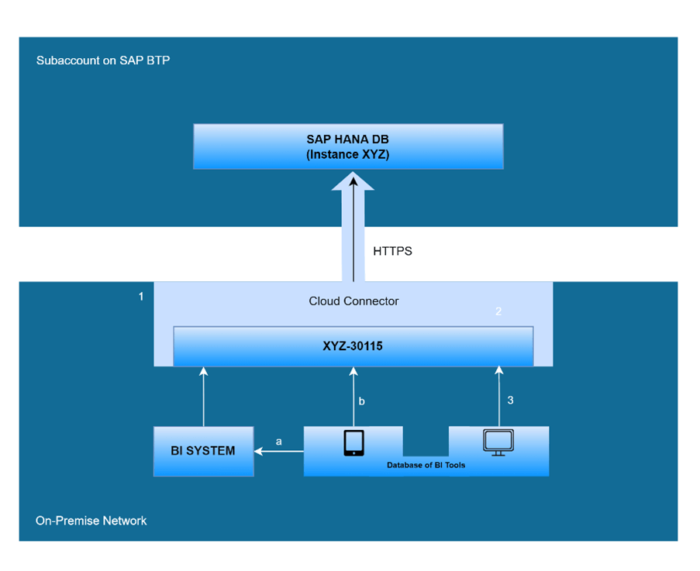

Purpose: The main purpose of CPI Cloud Connector is to provide data exchange and integration processes by establishing a secure connection between SAP Cloud Platform Integration and on-premises systems.
Providing Secure Communication: Cloud Connector creates a secure tunnel between cloud applications and on-premises systems by bypassing firewalls, so that internal systems can communicate without direct exposure to the Internet.
Protocol Diversity: Cloud Connector supports various protocols such as HTTP, HTTPS, RFC, SOAP and OData. In this way, a wide range of systems and applications can be adapted.
Authentication and Authorisation: It provides strong authentication and authorisation mechanisms to ensure that only authorised users and systems can access on-premises resources.
Monitoring and Logging: Cloud Connector provides comprehensive monitoring and logging capabilities to ensure traffic monitoring, troubleshooting, and security of data exchange.
Ease of Configuration: Installation and configuration of Cloud Connector includes processes such as establishing access controls, defining virtual hosts, configuring network settings, and establishing a trust relationship between cloud and on-premises systems.
Scalability and High Availability: Supports scalability and high availability options to respond to increasing integration needs and ensure uninterrupted operation.
SAP CPI Integration: Once installed, Cloud Connector seamlessly integrates with SAP Cloud Platform Integration, providing secure access of integration flows to on-premises systems.
Overall, SAP CPI Cloud Connector plays a critical role in hybrid integration scenarios where organisations need to securely and efficiently integrate their cloud-based applications with their on-premises systems.

SAP Integration Consultant
Your mail has been sent successfully. You will be contacted as soon as possible.
Your message could not be delivered! Please try again later.