How to Allocate Transportation Costs with SAP TM Internal Settlement
12 October 2026
9 -minute read
Your own trucks, your own fleet, your own drivers. So who actually pays for the transport? The sales organization delivers the goods to the customer, but the vehicle is run, and the cost is carried, by the company’s own logistics unit. If the two units don’t share that cost, profitability reports stop adding up.
SAP Transportation Management (TM) solves this with SAP TM internal settlement. The system creates an internal Forwarding Settlement Document (FWSD) from the freight order or freight booking, and the purchasing organization issues a debit note or an invoice to the sales organization.
In this post, we walk through how internal settlement is set up for OTR/DTR scenarios coming from ERP orders and deliveries, why the system requires a decentralized organization, and how to create the settlement document in a few clicks with the standard Fiori app.
In a shipper scenario, work reaches SAP TM as transportation requirements coming from ERP or S/4HANA documents. There are two types:
Requirement type
Full name
Source
When to use it
OTR
Order-Based Transportation Requirement
Sales order, purchase order, stock transport order
Planning starts at the order stage, before the delivery exists
DTR
Delivery-Based Transportation Requirement
Outbound / inbound delivery
Planning happens after the delivery is created
Here is the key point: in OTR/DTR scenarios there is no Forwarding Order (FWO). Forwarding settlement is normally created from a forwarding order, but in OTR/DTR the reference document is the freight order (FO) or the freight booking (FB) itself. That is exactly what makes internal settlement different.
How does internal settlement work?
The logic is simple. The purchasing organization that carries out the transport charges the cost to the sales organization it serves. The purchasing organization runs the transport with a carrier or with its own fleet, then recovers that cost from the sales side through an internal settlement document.
The system has one non-negotiable rule here: you cannot run internal settlement through a central (corporate) organization. The purchasing organization that executes the freight order must be defined in the organizational model with the Forwarding House function, in other words as a decentralized unit. Otherwise, the FO never shows up in the internal settlement list.
The company code relationship between the sales and purchasing organizations determines which document is created:
Scenario
Organizations
Result
Intracompany
Same company code
With the Intracompany Settlement flag in the organization data, the posting goes straight to FI/CO and the cost is reallocated between units
Intercompany
Different company codes
A billing document is created in SD, and a supplier invoice and expense posting are created in the receiving company
In short, within the same company code the system creates an internal debit between the sales and purchasing organizations. Once the company codes differ, it becomes a real invoice.
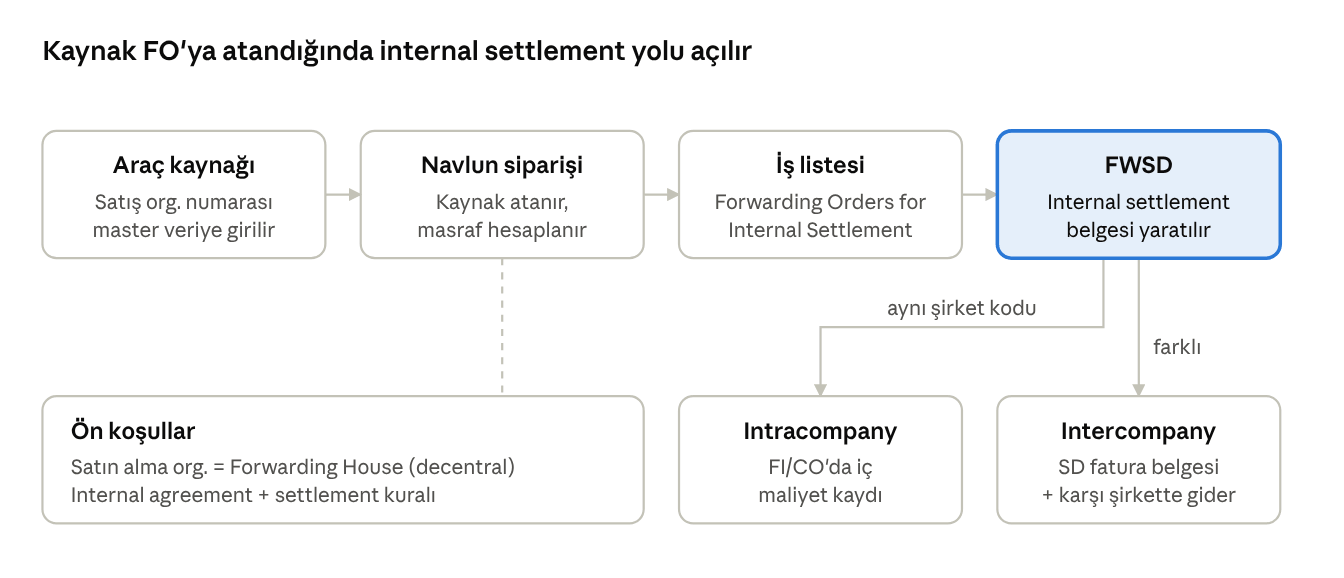
Figure: OTR/DTR Internal Settlement Flow
The sales organization on the vehicle resource decides who the FWSD is issued to. The company code relationship decides whether the posting lands in FI/CO or as an SD invoice.
Assigning the organization through the vehicle resource
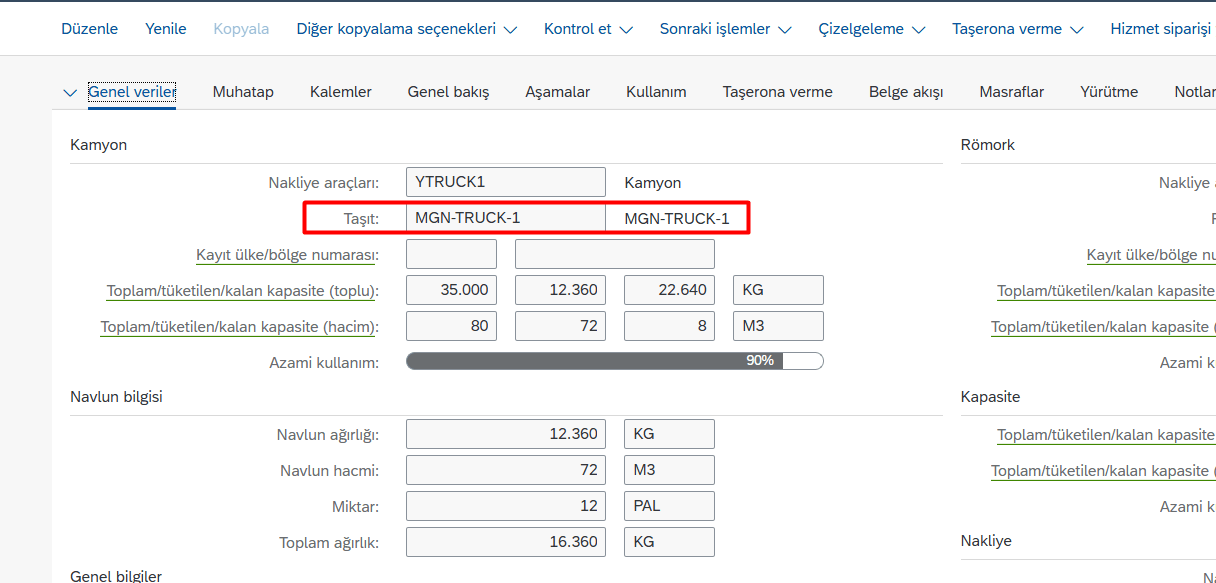
The most elegant way to trigger internal settlement is through resource assignment. In the master data of a vehicle resource in your own fleet, you enter the organization number of the sales organization that the vehicle works for. As soon as this resource is assigned to a freight order, the FO becomes eligible for internal settlement.
The setup follows this order:
Organizational model: Define the purchasing organization that executes the FO with the Forwarding House function. In same-company-code scenarios, set the Intracompany Settlement flag.
Resource: On the vehicle resource that belongs to the forwarding house, enter the sales organization the transport is performed for.
Freight order type: Activate internal charge calculation and internal settlement, and enter the forwarding settlement document type to be used.
Internal agreement: Create an internal freight agreement between the purchasing organization (service provider) and the sales organization (service recipient).
Internal settlement profile and settlement rule: Create the profile in the forwarding settlement category, and use the rule to define the FO status from which the document can be created (for example, In Execution).
Account integration: Map charge categories to cost elements, and organizations to cost centers or internal orders.
Once these steps are in place, all the planner has to do is assign the right vehicle to the FO. The system takes care of the rest.
Step by step: from freight order to forwarding settlement
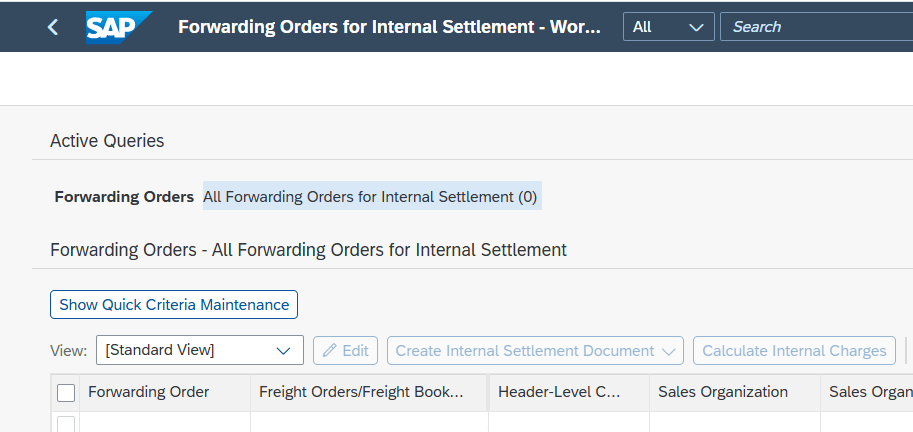
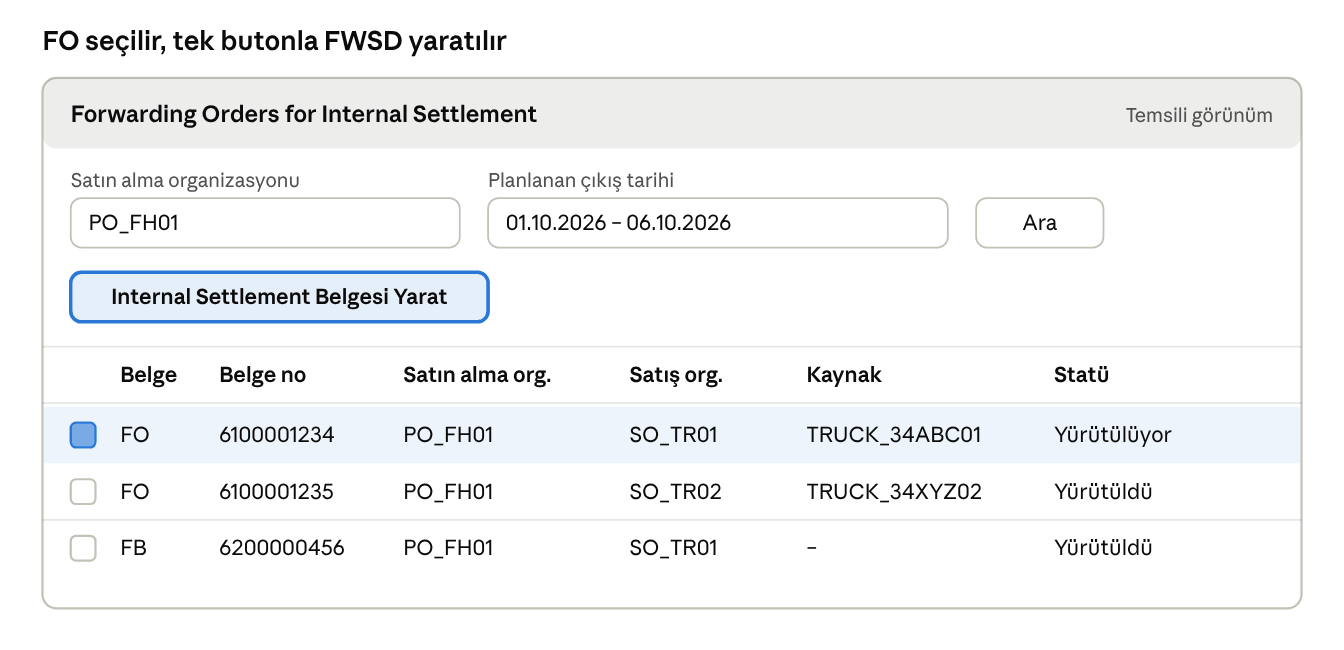
The standard system needs no custom development for this. The Forwarding Orders for Internal Settlement worklist lists the FOs and FBs that qualify for internal settlement from the purchasing organization’s point of view, and lets you create the FWSD with a single click.
1. Assign the vehicle to the freight order. In the planning screen or the FO details, assign the vehicle resource with the sales organization maintained and calculate charges. On the Charges tab, you should see both the external freight charge and the internal charge lines.
2. Move the FO to the settlement status. An FO that has not reached the status defined in the settlement rule (for example, In Execution or Executed) does not appear in the list.
3. Open the worklist. From the Forwarding Settlement menu, open the Forwarding Orders for Internal Settlement app. Enter the purchasing organization and a date range as query criteria.
4. Select the FO/FB and create the document. Select the relevant FO or FB line and click the Create Internal Settlement Document button. The system checks the sales and purchasing organizations and determines the right settlement type on its own.
In this representative screen, the selected line is an FO with a vehicle resource that has a sales organization assigned. The organization and resource values are examples.
5. Check and transfer the FWSD. Check the amounts and organizations in the forwarding settlement document, then transfer it to accounting. In the intracompany scenario, you can track the postings in cost center and cost element reports. In the intercompany scenario, you can track them through the SD billing document.
For high-volume operations, the same process can run as a background job, so internal settlement documents are created automatically at the end of the day for all completed FOs.
Common issues and tips
Symptom
Likely cause
Fix
FO does not appear in the worklist
The purchasing organization is defined as central, not as a Forwarding House
Change the organization function to Forwarding House
FO does not appear in the worklist
The FO status has not reached the settlement rule status
Move the FO to the execution status
Sales organization not found
The organization number on the vehicle resource is empty
Enter the sales organization in the resource master data and reassign the resource to the FO
Internal charge is zero
No internal agreement, or the agreement is outside its validity period
Create a valid agreement between the purchasing and sales organizations
Posting is not where you expect it
Wrong intracompany / intercompany setting
Check the Intracompany Settlement flag in the organization data
Conclusion: the right setup, minimal manual work
In OTR/DTR scenarios, internal settlement rests on three things: a decentralized (Forwarding House) purchasing organization, a vehicle resource with a sales organization assigned, and the standard Forwarding Orders for Internal Settlement worklist. Once all three are in place, the cost of every transport run with your own fleet is posted to the right unit, at the right time, without touching Excel.
At MDP Group, we design internal settlement, freight cost calculation and settlement processes end to end in S/4HANA TM and EWM projects. If you are also weighing licensing questions, our post on SAP EWM and TM licensing decisions is a good place to start. If you want to make the costs of your own fleet visible, get in touch with our team.
SAP TM – EWM Consultant
Serhan Kurt works on SAP TM and EWM projects covering transportation planning, freight management and warehouse processes. He is the author of “SAP TM: Senaryolar, Testler ve Uyarlamalar ile Birlikte”, the first book on SAP TM written in Turkish.