In SAP Signavio Process Intelligence, an investigation provides insights into the changes needed to enhance and optimize your process. It is a direct visualization of the data stored in transactional systems.
Each investigation begins with Process Discovery, which offers insights into various process variants, from the most common paths to non-conformance edge cases. Essentially, it visualizes all executed events from the event log.
Chapters guide the investigation with text descriptions of aims, objectives, findings, observations, etc., forming part of the overall structure of an investigation.
In Process Mining, the term "Activity" describes the different types of possible events, while "Event" is most often used to describe individual executions of activities.
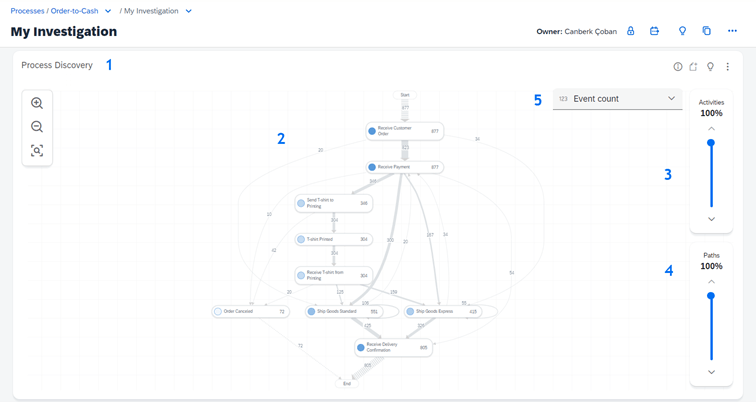
1. Process Discovery
Every investigation in SAP Signavio Process Intelligence shows a process discovery widget. This is a visual representation of all cases.
2. Activities & Sequences
View a process diagram representing the flow & interaction of activities within the process. Events are displayed as activities, with paths displayed between activities to help understand the various sequences of activities.
3. Activity Slider
By sliding up you can add more activities to the discovery model, depending on your data set/event log.
4. Sequence Flow Slider
Depending on your data set, you can add more detected connections & variants to the discovery model.
5.1 Event Count
Display how often activities are executed.
5.2 Case Count
Display how many unique cases are involved in each activity.
5.3 Cycle Time
Display how much time is between two activities or how long an activity takes.
Various widgets are used to tell stories in your investigation, with the main purpose of exploring and assessing the interaction of events and key process factors.
You can choose from different widgets based on your questions and objectives. For instance, some widgets focus on conformance checks, variance, or performance analysis. Essentially, a widget represents a single analytical component.
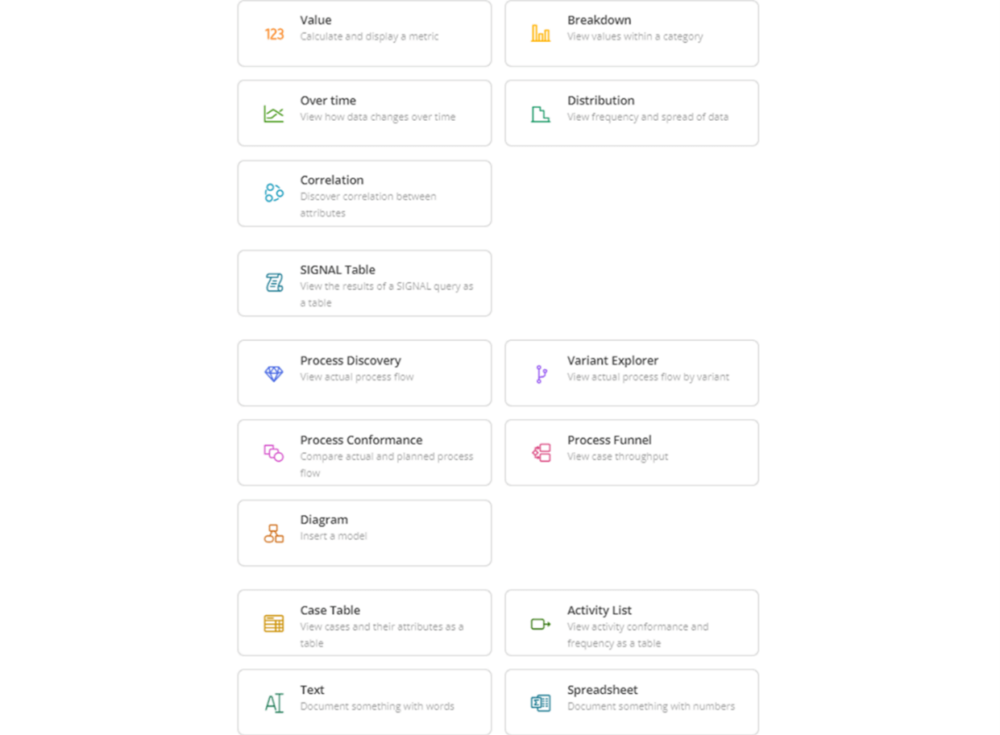
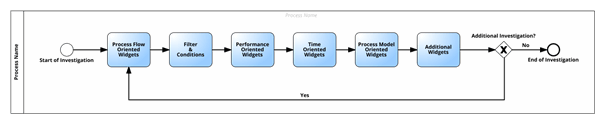
Process Name: Processes represent transactional data.
Chapters: Chapters allow a breakdown for clarifying and filtering.
Investigation 1 – First Investigation: One investigation covers ideally (only) one specific topic.
Chapter 1.1 – Process Flow-Oriented Widgets
Chapter 1.2 – Filter & Conditions
Chapter 1.3 – Performance-Oriented Widgets
Chapter 1.4 – Time-Oriented Widgets
Chapter 1.5 – Process Model-Related Widgets
Chapter 1.6 – Additional Widgets
Investigation 2 – Second Investigation
Chapter n.n

SAP EWM Consultant
Your mail has been sent successfully. You will be contacted as soon as possible.
Your message could not be delivered! Please try again later.