Blog

Carbon Emission – SAP TM

Introduction

Sustainability is no longer a footnote tucked into the last page of corporate reports  it is an operational parameter that directly influences supply chain decisions. Regulations such as the EU's CSRD (Corporate Sustainability Reporting Directive) and CBAM (Carbon Border Adjustment Mechanism) are compelling companies to substantiate their transportation-related emissions with concrete data.Logistics operations account for roughly 8% of global carbon emissions. That figure alone places the sector squarely in the crosshairs of emission reduction pressure. SAP Transportation Management (SAP TM) provides infrastructure for calculating these emissions alongside its transportation planning and execution capabilities  but as with any tool, understanding its boundaries is just as important as knowing its strengths.In this article, we will examine SAP TM's carbon emission calculation framework in technical detail, drawing on real project experience, and we will be upfront about what it can and cannot do.

What Does Carbon Emission Calculation Cover in SAP TM?

Emission calculation in SAP TM refers to producing estimated greenhouse gas (GHG) values generated during transportation activities. The word "estimated" deserves emphasis here: the system does not consume real-time fuel consumption data. Instead, it generates a projection based on predefined emission factors and transportation parameters.The key inputs feeding the calculation are:
  • Transportation mode: Road, ocean, air, rail
  • Distance: Route distance calculated by the system or entered manually
  • Vehicle type: Truck class, vessel type, aircraft model, etc.
  • Payload weight or volume: Gross weight/volume on the Freight Order
  • Emission factors: Per-unit emission values defined by the user in the system (e.g., gCO₂/tkm)
With the resulting output, companies can:
  • View CO₂e (carbon dioxide equivalent) values per shipment,
  • Compare the emission impact of alternative transportation plans,
  • Feed this data into corporate sustainability reporting as a structured input.

Technical Architecture: How Does the Calculation Work?

1. The Level at Which Calculation Is Triggered

Emission calculation is triggered at the Freight Order (FO) or Freight Booking level. When a Freight Order is created or updated, the system can run the emission calculation either automatically or manually, depending on the configuration.In multi-leg shipments, a separate calculation is performed for each leg/stage, and the total emission is consolidated at the FO level. However, there is an important detail here: allocation logic. If a vehicle carries multiple shipments, how the emission is distributed across loads (weight-based, volume-based, equal distribution) must be configured correctly. This is a point frequently overlooked during implementations.

2. Calculation Formula and Logic

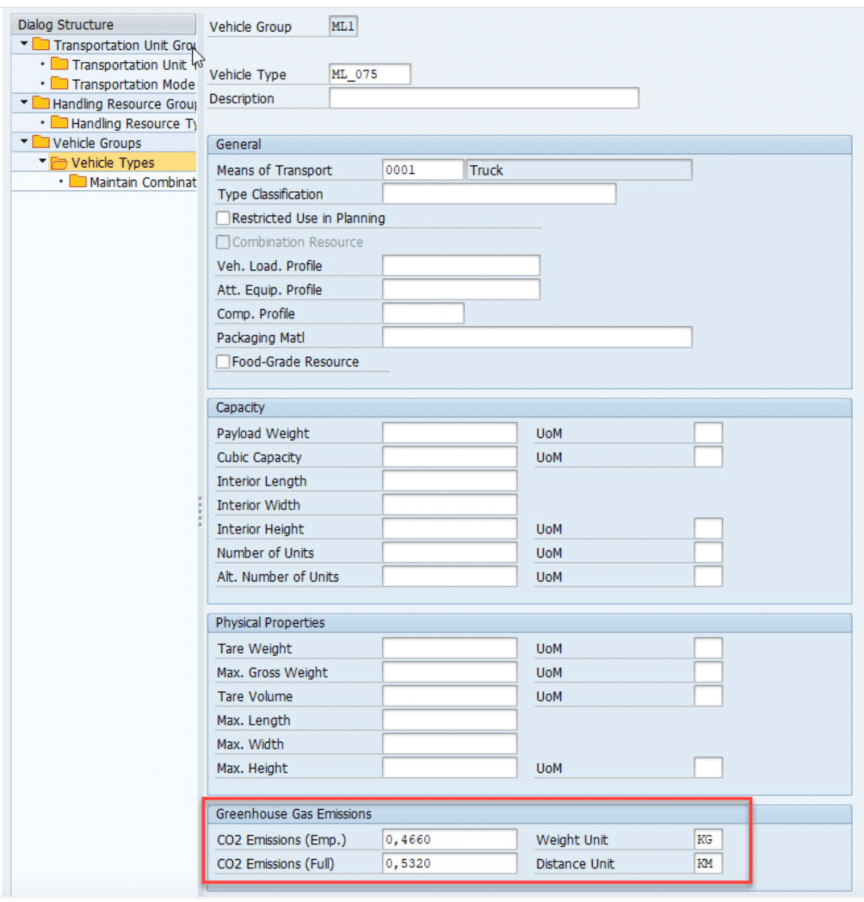
Emission calculation parameters in SAP TM are configured through Vehicle Types.

Calculation Formula and Logic
 The core formula used by the system is as follows:Emission = (Eempty + (Efull - Eempty) × (Total Weight / Resource Capacity)) × DistanceWhere the variables are:
  • Eempty: Emission factor per unit distance when the vehicle is empty (e.g., gCO₂/km)
  • Efull: Emission factor per unit distance when the vehicle is fully loaded (e.g., gCO₂/km)
  • Total Weight: The total weight of the cargo being transported
  • Resource Capacity: The maximum carrying capacity of the vehicle
  • Distance: Route distance (km)
The logic behind the formula is straightforward: the system performs a linear interpolation between the empty vehicle emission and the fully loaded vehicle emission. As the load factor (Total Weight / Resource Capacity) increases, the emission value approaches Efull. This means a half-loaded truck is not calculated with the same emission as a fully loaded one  the capacity utilization rate is directly reflected in the result.A concrete example:

Parameter

Value

Eempty

0.5 kgCO₂/km

Efull

1.2 kgCO₂/km

Total Weight

12,000 kg

Resource Capacity

24,000 kg

Distance

800 km

Calculation: (0.5 + (1.2 - 0.5) × (12,000 / 24,000)) × 800 = (0.5 + 0.35) × 800 = 680 kgCO₂

This formula can be customized by defining different Eempty and Efull values for each vehicle type and transportation mode. Which emission factors apply to which transportation mode, the distance calculation method (GIS-based, fixed distance tables, etc.), and unit conversion rules are all configured in Customizing settings.

3. Calculated vs. Reported Emissions

Emission values in SAP TM can be maintained in two distinct ways:
  • Calculated: The value automatically generated by the system using the formula above. It is an estimate based on emission factors and transportation parameters.
  • Reported: The actual or verified emission value provided by the carrier or an external source. For example, when a carrier submits an emission report based on real fuel consumption, this value can be entered as the reported figure.
Maintaining both values side by side gives companies a valuable analytical capability: the variance between calculated and reported values can be tracked over time to calibrate the accuracy of emission factors. This structure can also serve as an input for carrier performance evaluation.

4. Emission Factor Management

This is a critical distinction: SAP TM does not ship with preloaded emission factor tables. The system gives you a structure to define emission factors, but you must populate the values yourself.In practice, companies typically draw from these sources:
  • GLEC Framework (Global Logistics Emissions Council): The most widely accepted framework for the logistics sector. SAP TM's calculation logic is designed to align with this framework.
  • ISO 14083: The international standard for quantifying GHG emissions from transportation. SAP is actively working on compliance with this standard.
  • DEFRA, EcoInvent, and similar databases: Factors from these sources can be manually loaded into the system, but they are not natively integrated.
The accuracy and currency of emission factors directly determine the reliability of calculation results. An annual update discipline is essential.

Emission Data in the Planning Process: What Can and Cannot Be Done

Let's be straightforward here. SAP TM's optimization engine (optimizer) fundamentally operates on cost, time, and capacity parameters. Adding carbon emission as a direct optimization criterion into the optimizer's objective function is not possible in the standard configuration.So, does emission data play no role in the planning process at all? No, it does   but in a different way:A realistic scenario:A planner creates two alternative plans for a shipment from Istanbul to Germany:

Plan A (Road)

Plan B (Intermodal)

Transit time

3 days

5 days

Cost

€2,800

€2,200

Emission

1,450 kgCO₂e


620 kgCO₂e

The planner can view these three values side by side and make an informed decision. However, this is a manual evaluation, not the optimizer automatically selecting the lowest-carbon route.If you want to make carbon an automated optimization parameter, this requires a BAdI implementation or custom logic and is a non-standard development effort.

Integration Scenarios

Emission data calculated in SAP TM can be carried into corporate sustainability reporting. However, these integrations typically require additional configuration and middleware:
  • SAP Sustainability Control Tower: Emission data from TM can be transferred via BTP (Business Technology Platform) or CPI (Cloud Platform Integration). A "plug-and-play" integration should not be expected.
  • SAP Analytics Cloud (SAC): Emission dashboards can be built on top of TM data. This is a relatively easier integration point.
  • SAP Product Footprint Management: Used for calculating product-level carbon footprints. Transportation emission data from TM can be fed as an input into product footprint calculations, but this flow requires configuration.
Each of these integrations carries its own implementation effort. This effort should not be underestimated in project planning.

Limitations of SAP TM in This Area

Using a tool correctly starts with knowing its limits:
  1. No real-time data: SAP TM does not measure actual fuel consumption via telematics or IoT data. Calculations are estimates based on emission factors. If you want to perform variance analysis against actual values, you need to integrate data from external systems.
  2. No native carbon support in the optimizer: As noted above, the emission value is a display and reporting data point  not a decision variable in the standard optimizer.
  3. Well-to-Wheel vs. Tank-to-Wheel distinction: SAP TM's standard calculation is generally Tank-to-Wheel (TtW) based. Including emissions from fuel production and distribution (Well-to-Tank) requires additional configuration.
  4. Complexity in multimodal shipments: If a shipment involves a road + ocean + rail combination, each mode needs different emission factors, different allocation logic, and different distance calculation methods. Setting up this configuration correctly demands significant expertise.
  5. Emission factor maintenance: Updating factors is entirely the user's responsibility. There is no automated update mechanism.

Implementation Recommendations

Challenges encountered in real projects and suggested approaches:
  • Master data quality comes before everything else. If distances are wrong, vehicle types are missing, or capacity data is inconsistent, the emission calculation becomes meaningless. Sufficient time must be allocated to master data cleansing in the first phase of the project.
  • Use sector-specific emission factors. Instead of generic averages, define factors that match your transportation modes and geography. For example, the Euro 5 vs. Euro 6 vehicle mix on Turkish roads differs significantly from Western Europe this directly affects the average emission factor.
  • Start small. Rather than activating emission calculation for all transportation modes and routes simultaneously, begin with your highest-volume corridor and expand iteratively.
  • Define reporting requirements upfront. Who will consume the emission data, in what format, and at what frequency? The answers to these questions directly shape the technical configuration.
  • Validate against independent tools. Cross-checking emission values produced by SAP TM against widely used independent calculation tools such as EcoTransIT or BigMile increases the credibility of results.

Brief Comparison with Alternative Tools

Criterion

SAP TM

EcoTransIT World

BigMile

Integration

Native within SAP ecosystem

API-based

API-based

Calculation standard

GLEC / ISO 14083 aligned

GLEC / EN 16258

GLEC / ISO 14083

Preloaded emission factors

No (manual definition)

Yes

Yes

Planning integration

Within the same system

Separate system

Separate system

Real-time data

No

Limited

Limited

SAP TM's greatest advantage is that emission data lives within the same system as transportation planning. Its disadvantage is that it is not a standalone specialist tool in this domain and does not offer ready-made data sets.

Conclusion

SAP TM provides a solid infrastructure for calculating transportation-related carbon emissions. However, this infrastructure should be viewed not as a plug-and-play solution but as a framework that requires proper configuration, feeding, and maintenance.The system gives you the calculation engine and the data structure; you build the emission factors, allocation rules, and reporting logic. In this regard, SAP TM is not a "magic wand" for carbon emissions, it is a powerful tool in the right hands.Future logistics leadership will belong to those who integrate emission data into operational decisions, not just optimize for cost. SAP TM is a solid starting point for that shift.

Similar
Blog

Your mail has been sent successfully. You will be contacted as soon as possible.

Your message could not be delivered! Please try again later.