In SAP EWM Labor Management, formulas and conditions may be useful in preprocessing, planning and simulation of workload. You may create custom formulas to be used in specific conditions to calculate of duration, necessary workload, or engineered labor standards.
This blog post will display multiple examples that include using SAP EWM Formula Editor.
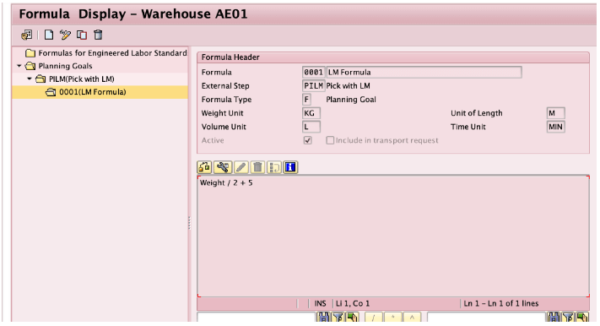
Weight / 2 + 5
It is also possible to change and control the units that will be used for calculation. In this case we are using KG for weight unit and MIN for time Unit.
2. We need a planned workload so that the system can use the formula for planning purpose. Note that LM should be activated for your warehouse number so that the system can create planned and executed workload for relevant activities. In this case we are using the external step PILM(Picking with Labor Management). Therefore we created a picking warehouse task.
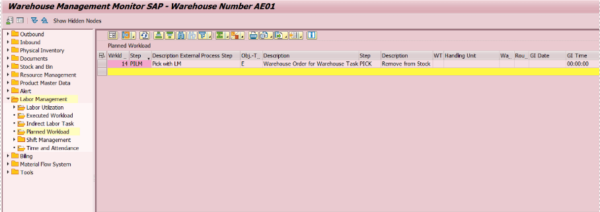
3. Before executing the warehouse task, we can use /SCWM/PL transaction to calculate the planned duration using Formula 0001.
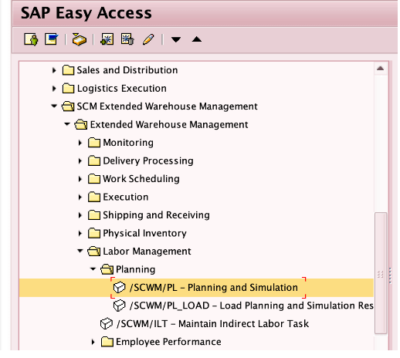
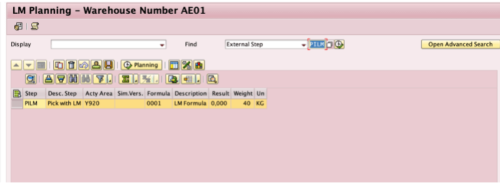
Using the Find bar, search for the external step and you will see the planned workload list.
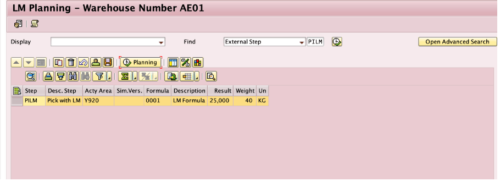
After selecting the line and execuiting, under result tab the system will calculate the planned duration for the relevant warehouse task. (40/2+5 = 25)
1. In the Formula Editor we create a new formula for Engineered Labor Standards. Just like the above example each unit may be customized.
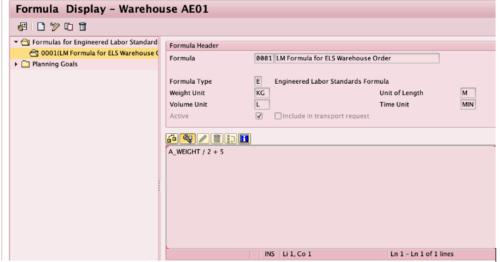
We will use the same formula (A_WEIGHT/2 + 5) in this test case as well.
2. Determine Engineered Labor Standard
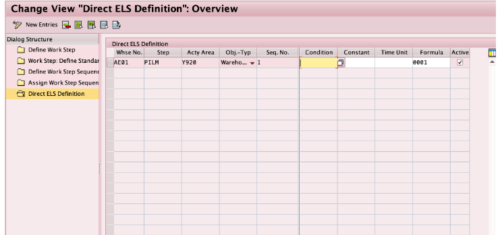
Under Direct ELS Definition tab, we add a new entry for the activity area and external step. For the Obj-Type we select Warehouse order for warehouse task. If you want to apply this formula only in a specific condition, than you may use /SCWM/LM_CE to create a condition for ELS and then add it to table here, we will not use a condition in this case. We only enter the formula 0001 and select Active checkbox.
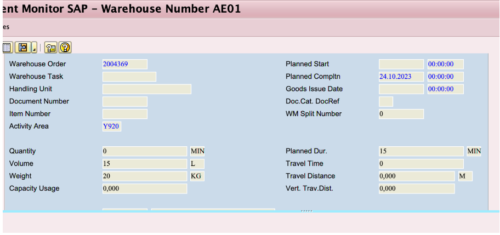
Because of our customizing, for the activity area Y920 and for PILM warehouse tasks, the system will automatically use the formula and display the planned duration time automatically in the details section for the warehouse order.
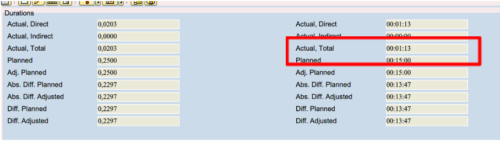
If you execute the relevant activity, the system than calculate the planned duration and actual duration of the workload and under Executed Workload tab in Warehouse Management Monitor you may display efficiency.
1. Once more we create a new formula using /SCWM/LM_FE transaction. This time we will use the equation A_PLDURA / 8, which means the planned duration time divided by eight hours. We assume that it takes 8 hours for a processor to complete the relevant workload.
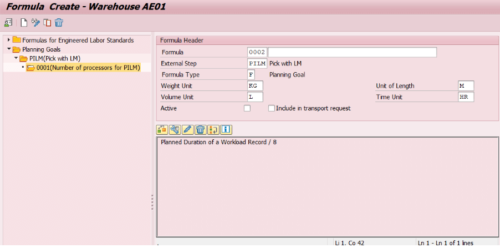
2. After saving the formula we can youse Planning and Simulation function (/SCWM/PL) to calcuate the number of processor neccessary for the activity. For an activity with 24 Hrs planned duration, the system will use the formula and display 3 processors are required for the activity.
Below you may find more examples provided by SAP.
The warehouse manager performs planning based on preprocessing that considers deliveries from a wave. He or she links this to the following three planning formulas:
To sum up, we examined very basic examples of possible use scenarios for SAP EWM Labor Management Formula Editor. The scenarios may be much more complex according your business requirements.
Please feel free to reach out to us logistics@mdpgroup.com for any feedback or questions.

SAP EWM/TM Consultant
As a consultant specializing in SAP logistics modules, I provide end-to-end solutions in warehouse operations, shipment planning, and freight cost management processes. I actively participate in system design and integration projects that increase operational efficiency and optimize costs, primarily focusing on SAP EWM and TM.
Your mail has been sent successfully. You will be contacted as soon as possible.
Your message could not be delivered! Please try again later.