Developing SAP Fiori applications requires choosing the right development method upfront. The two primary approaches — SAP Fiori Elements and SAPUI5 — offer fundamentally different trade-offs between flexibility and development speed. Choosing the wrong method can mean significant rework, higher maintenance costs, or applications that fail to meet business requirements. This guide walks through both methods, their code structures, and a direct comparison so you can make an informed decision.
SAP Fiori is a user experience solution from SAP that provides a modern, simple user experience for enterprise applications. It is designed to provide users with a consistent, personalized, responsive and simple experience across devices and platforms. The interface solution is designed to be intuitive with an emphasis on a single user action to complete a task. SAP Fiori gives users access to key business applications such as SAP ERP and SAP CRM from any device.
Fiori applications have gained great momentum lately, thanks to their responsive design and customizable nature. Large companies, in particular, are transitioning towards using Fiori together with HANA. But Fiori’s standard applications aren’t exactly one-size-fits-all — many companies’ needs can only be met with customized Fiori applications that need to be developed. That is why the methods through which Fiori applications are developed must be thoroughly analyzed before starting.
For a broader context on how Fiori has evolved over time, see our post on The Evolution of Fiori. For concepts and best practices, refer to SAP Fiori Concepts and Best Practices.
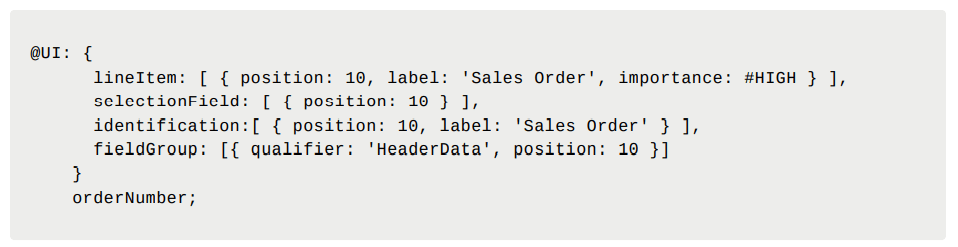
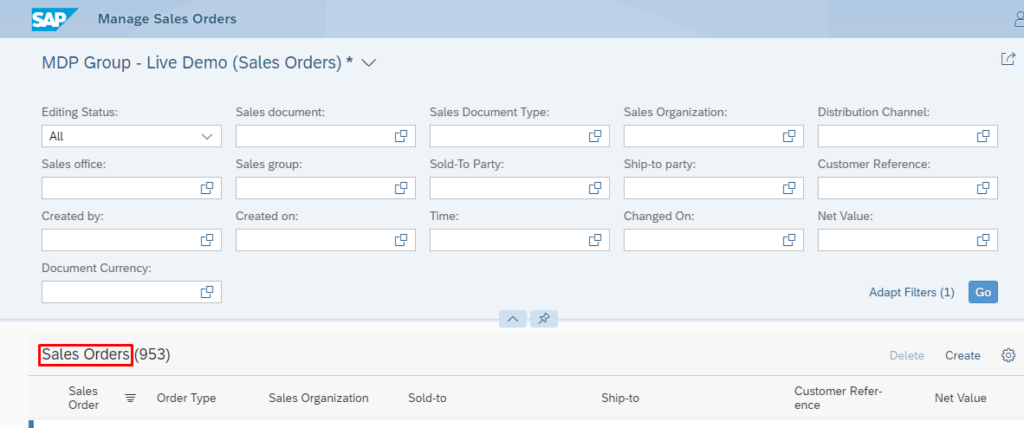
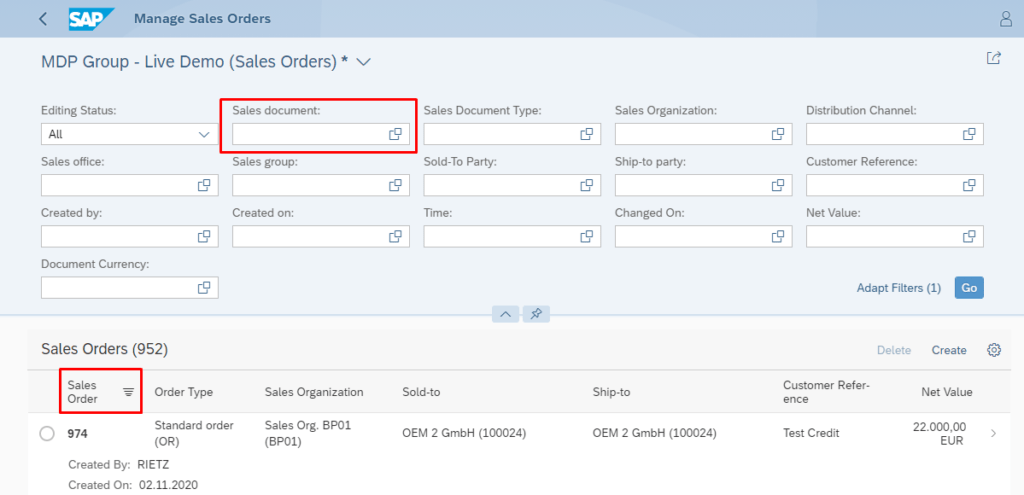
SAP Fiori Elements allow making use of standard application features and templates, enabling users to develop Fiori applications in less time and at a lower cost. With this method, the SAPUI5 code is automatically generated in accordance with the defined Metadata and Annotations on CDS. The fact that OData services are also generated from CDS significantly reduces cost and development time for applications.
Fiori Elements also enable features such as saving variants, filtering, grouping and sorting by default. Furthermore, Fiori Elements support mobile devices without the need for additional development. CDS views support Create, Remove, Update, Delete (CRUD) actions through the Business Objects Processing Framework (BOPF); meaning these features are also available with SAP Fiori Elements. This structure allows developing Fiori applications that can generate reports, make analysis, create documents and carry out updates.

View:
View:
SAPUI5 allows developing quite flexible Fiori applications and designs. Users looking for different designs and specialized solutions can look into SAPUI5’s extensive component library. Unlike Fiori Elements, SAPUI5 gives developers full control over every aspect of the UI — at the cost of significantly more development effort.
For a deeper look at what SAPUI5 offers, see our post on Benefits of SAPUI5 Smart Components.
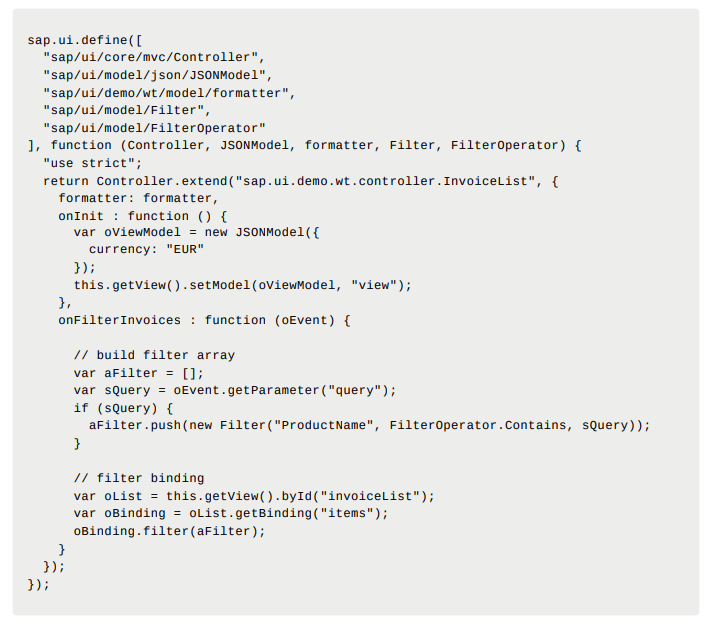
View:
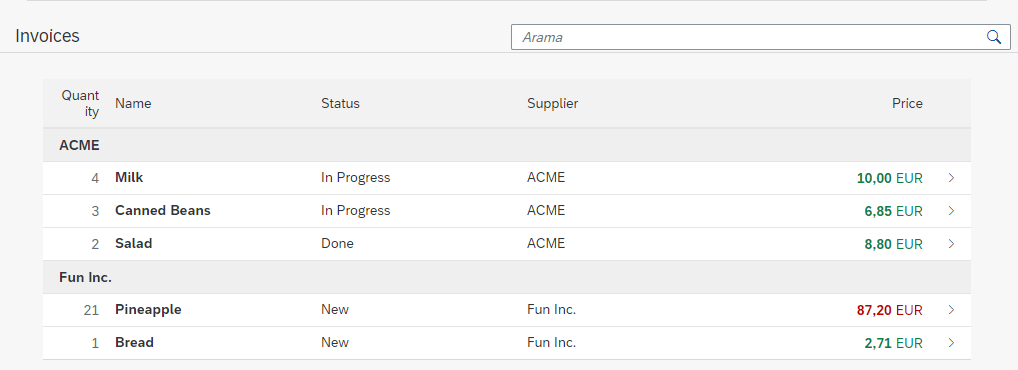
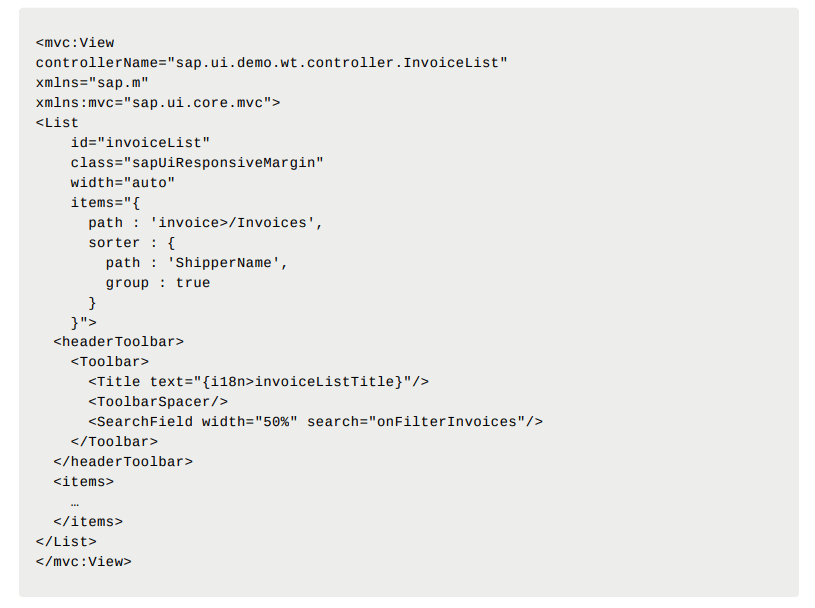
View:
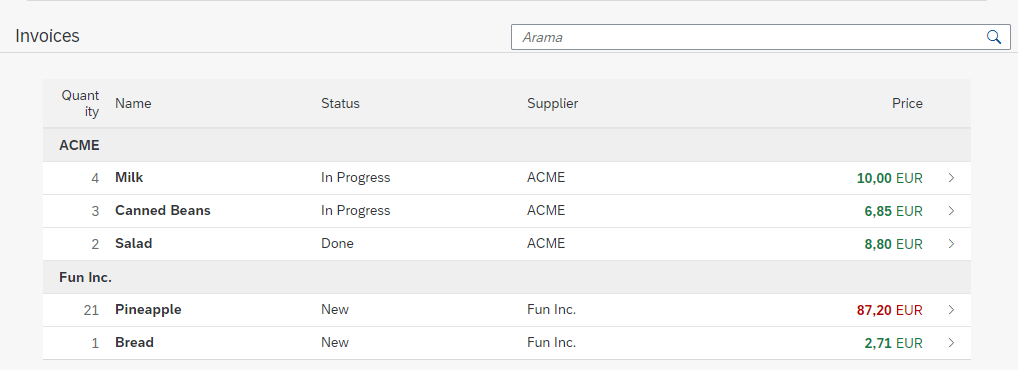
| SAPUI5 | SAP Fiori Elements |
|---|---|
| Though the flexibility of the development model is a plus, developers need to spend a lot of time on UI5 codes, as each detail needs to be meticulously coded. | SAPUI5 code is automatically generated through CDS. No SAPUI5 or JavaScript coding is needed. |
| Upgrading applications to a new version requires rework. | Does not require rework for upgrading applications to a new version. |
| Development is costly and time-consuming. | Development is relatively quick and inexpensive. |
| High maintenance costs. | Relatively low maintenance costs. |
| Advantageous design and flexibility. Applications can be customized. | Complex development and custom designs are not always possible. |
| Integration with Open Source and third-party libraries is possible. | Integration with Open Source and third-party libraries is not supported. |
| Requires performance optimization and improvements. | Provides high performance with FE. Requires little performance optimization. |
| New applications developed through Web IDE require to be deployed in the development system again. | Activating after editing the code is sufficient. Changes can be tested through Launchpad. No need for deploying again. |
| Unable to utilize standard Fiori features by default. Requires development for the use of these features. | Standard Fiori features such as saving variant, filtering, grouping and sorting are available. |
| Requires development for use by mobile devices. | Supports use by mobile devices. No need for additional development. |
The choice between SAPUI5 and Fiori Elements depends primarily on your project’s requirements and constraints. If you need a standard report, list, or transactional application that fits within SAP’s design patterns, Fiori Elements is almost always the better choice — it is faster, cheaper and easier to maintain. If your project requires a unique UI design, integration with third-party libraries, or complex custom interactions that fall outside Fiori’s standard templates, SAPUI5 gives you the flexibility needed.
Many enterprise implementations benefit from a hybrid approach: using Fiori Elements as the baseline and extending specific screens with SAPUI5 where genuinely needed. This approach balances speed with flexibility while keeping overall maintenance costs manageable.
For a full picture of what Fiori development can offer your business, see The Advantages of Developing with SAP Fiori.
What is the main difference between SAPUI5 and SAP Fiori Elements?
SAP Fiori Elements automatically generates SAPUI5 code from CDS metadata and annotations — no manual UI5 or JavaScript coding is required. SAPUI5 is a full-featured JavaScript framework where developers write every component manually. Fiori Elements is faster and cheaper for standard scenarios; SAPUI5 is more flexible for custom or complex designs.
Can SAP Fiori Elements be used for all types of applications?
Fiori Elements works well for standard list reports, object pages, and analytical list pages. However, it does not support complex custom designs, third-party library integrations, or highly specialized UI interactions. For those scenarios, SAPUI5 or a hybrid approach is required.
Does SAP Fiori work on mobile devices?
Yes. SAP Fiori is inherently responsive and designed for use across desktops, tablets and smartphones. Fiori Elements supports mobile use without additional development. SAPUI5 applications also support mobile, but require explicit responsive design implementation by the developer.
What happens when SAP releases new Fiori versions?
With Fiori Elements, upgrading to a new Fiori version typically requires no rework — the automatically generated code adapts to the new version. With SAPUI5, version upgrades may require significant rework, especially if the application relies on components or APIs that change between releases. This makes Fiori Elements significantly easier to maintain over time.
SAPUI5 — Official Documentation
SAP Fiori Design Guidelines
What is SAP Fiori? — MDP Group
The Advantages of Developing with SAP Fiori — MDP Group
Benefits of SAPUI5 Smart Components — MDP Group

SAP Fiori Team Lead
Your mail has been sent successfully. You will be contacted as soon as possible.
Your message could not be delivered! Please try again later.