gCTS (Git-enabled Change and Transport System) is SAP's approach to integrating Git-based version control into the ABAP development and transport workflow. It stores all versions of SAP ABAP development and Customizing objects in a Git repository, enabling developers to push changes to a remote repository and pull them into any system — development, test, or production. This approach brings modern DevOps practices (CI/CD) to SAP ABAP, which traditionally relied solely on the proprietary Change and Transport System (CTS). According to SAP Help Portal, gCTS is supported from SAP S/4HANA 1909 onwards. Git keeps track of multiple versions of files, allowing developers to access, compare, update, and distribute any recorded version and use it as a backup in case of a system error.
To move ABAP development objects from one system to another, Git serves as the technical foundation. Once a repository is registered on the ABAP system, ABAP developers use the Git server as cloud storage and clone the repository content to their file system. To make objects available in other systems, they are pushed to a remote repository and pulled from those other systems.
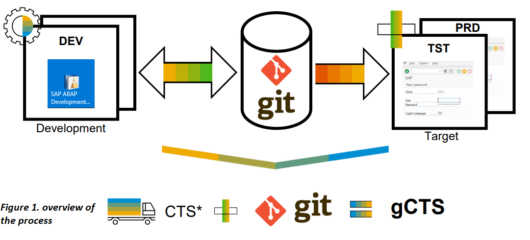
Having continuous integration (CI) procedures for ABAP development is possible using gCTS. CI procedures support the management of code modifications made by many developers. Changes become available for third parties after the developer pushes the code into a repository. Once the code is in the repository, CI servers observe it and create a new build, deploy it to the runtime system, test it, and send feedback to the developer.

Continuous deployment (CD) is the process of automating the publication and deployment of software updates. When a code commit passes an automated testing phase, it is published into the production environment automatically. This ensures every validated update is available to end-users without manual intervention.

First, register a remote Git repository on the ABAP system using the SAP Fiori app for gCTS. The repository is then cloned to the ABAP system's file system. Define the packages you want to manage, then perform ABAP development. Changed objects recorded in transport tasks are pushed to the remote repository. When a transport request is released from the ABAP system, gCTS clones the objects to the file system and adds them to the gCTS queue (accessible via transaction STMS). The target system can then be updated by pulling requests or automatically via a CI/CD pipeline.
Required authorization objects for gCTS users: S_RFC, S_SERVICE, S_BTCH_ADM, S_BTCH_JOB, S_CTS_ADMI, S_CTS_SADM, S_DATASET, S_GCTS_REP, S_LOG_COM, S_TRANSPRT.

The traditional SAP CTS is a proprietary system for transporting ABAP objects between systems using transport requests. It works reliably but lacks version control capabilities — there's no way to compare changes, roll back to a previous state, or branch development. gCTS enhances CTS by using Git as an external version management system alongside it. Developers still use transport requests, but objects are also stored in a Git repository where full version history is maintained. This makes gCTS a bridge between traditional ABAP lifecycle management and modern DevOps practices.
gCTS is primarily designed for SAP S/4HANA on-premise and SAP BTP ABAP Environment (Steampunk). For SAP S/4HANA Cloud (the multi-tenant public cloud edition), SAP uses a different delivery model where customer modifications are not made at the ABAP layer. In the BTP ABAP Environment, a similar concept called "abapGit" is available for object version management. For on-premise deployments, gCTS is the recommended approach from SAP S/4HANA 1909 onwards.
Yes. gCTS is compatible with any Git-compliant repository hosting service, including GitHub, GitLab, Bitbucket, and Azure DevOps. The gCTS Fiori app allows you to register any remote Git repository URL. The choice of Git platform depends on your organization's existing toolchain and security requirements. CI/CD pipeline integration (using Jenkins, Azure Pipelines, GitHub Actions, etc.) can be configured to trigger automated ABAP builds and tests whenever code is pushed to the repository.

SAP Fiori Consultant
Özge Yılgür is an SAP consultant at MDP Group specialized in SAP Fiori and SAPUI5. She develops custom UI5 applications on S/4HANA using OData and CDS services. She delivers Clean Core–compliant solutions and designs cloud architectures with SAP BTP, Fiori Elements, and CAP. She assumes end-to-end responsibility in international projects.
Your mail has been sent successfully. You will be contacted as soon as possible.
Your message could not be delivered! Please try again later.