SAP S/4HANA offers powerful Output Management capabilities that automate business processes and enhance efficiency. Within this scope, Email Templates play a crucial role in delivering business documents, notifications, and alerts via email. Particularly, the SAP Fiori-based user interface simplifies email template management, allowing businesses to customize them according to their corporate identity.
In this article, we will take a detailed look at how to manage and customize email templates in SAP S/4HANA.
Email templates are predefined email formats used to manage automated emails sent from SAP systems. These templates help maintain consistency in communication, protect brand identity, and accelerate business processes when interacting with customers or suppliers.
Standardized Communication: Ensures corporate standards by defining the format and content of internal and external emails.
Personalization: Allows the inclusion of dynamic information specific to customers or business partners.
Automation: Reduces manual intervention in repetitive tasks (e.g., order confirmation, invoice delivery).
Multi-Language Support: Enables email communication in different languages for global operations.
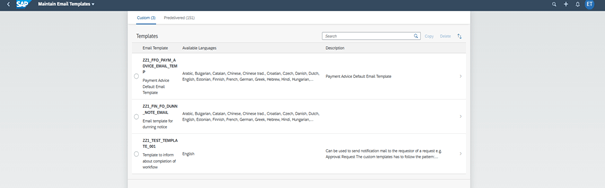
SAP S/4HANA uses SAP Fiori applications to manage email templates. The standard "Maintain Email Templates" application allows users to edit email content, create templates in multiple languages, and monitor system-triggered emails. Email templates for Flexible Workflows can also be managed and activated here, enabling easy control of workflow-related notifications.
1) Open SAP Fiori Launchpad.
2) Launch the "Maintain Email Templates" application.
3) View existing templates or create a new template.
4) Edit the template content using HTML or plain text format.
5) Configure language options to enable multi-language support.
6) Save changes and test the email template.
With these steps, you can easily manage the content and design of system-generated emails through the SAP Fiori interface.
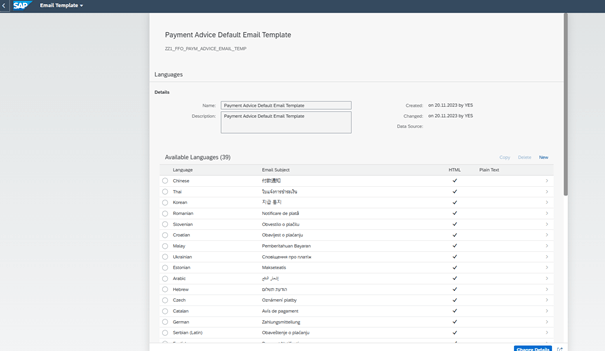
SAP enables the customization of email templates by integrating with tools such as Adobe Forms, and Business Rules Framework (BRF+). These tools allow businesses to dynamically modify email templates to align with corporate needs and enhance user experience.
By leveraging these customization features, businesses can ensure that automated emails remain professional, personalized, and aligned with brand identity.
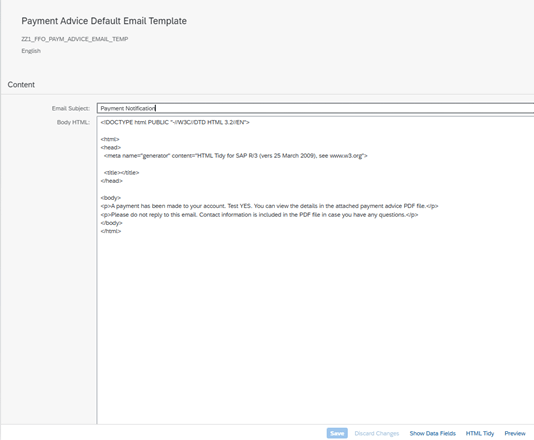
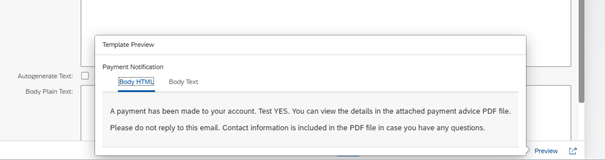
In SAP S/4HANA, Email Templates are a powerful way to manage automated communication. With the "Maintain Email Templates" application, users can customize, personalize, and test email content. You can take advantage of SAP’s email management tools to optimize business processes, enhance customer experience, and maintain brand identity
Meet our expert support for SAP Fiori based applications at MDP Group.
Contact us now for customized solutions.

SAP Fiori Consultant
Emrah Tezcan, who serves as an SAP ABAP & Fiori Consultant at MDP Group, is a highly skilled SAP expert developing enterprise solutions based on ABAP Cloud and the RAP (RESTful ABAP Programming Model) on the S/4HANA architecture. With deep expertise in extensibility approaches aligned with the Clean Core strategy, HANA Output Management, Adobe Forms, and Flexible Workflow processes, Tezcan takes end-to-end responsibility across the entire software development lifecycle (SDLC), from analysis and design to testing/UAT, go-live, and post-production support.
Your mail has been sent successfully. You will be contacted as soon as possible.
Your message could not be delivered! Please try again later.